


 The short answerWebflow vs Wix in 2026: Webflow wins for B2B SaaS marketing sites where scalability, SEO performance, and design freedom matter. Wix Studio wins for small-to-mid projects where simplicity and the Wix ecosystem matter more than flexibility. Studio closes the gap with Wix Editor but doesn't match Webflow on CMS depth, code portability, or page speed at scale.
Webflow vs Wix Studio pricing in 2026: Webflow's standard site plans cost $15 to $25/mo per site, billed yearly. Premium's $25/mo includes 50 GB of bandwidth, and higher bandwidth tiers cost more. The free Starter Workspace hosts unlimited paid sites, though most agencies add a Workspace plan (Freelancer $16/mo, Agency $35/mo) for staging and client seats. Wix Studio runs $19 to $159/mo per site from Basic to Elite, billed yearly, with a custom-priced Enterprise tier above Elite.
When building websites, your chosen tools can (and will) make or break your project.
It's no longer about creating a good-looking product; you need a platform that aligns with your goals, launching a dynamic blog, running a smooth e-commerce store, or showcasing an interactive portfolio.
For years, Webflow and Wix have been two of the most popular website builders, each catering to different audiences. Webflow is known for its flexibility, scalability, and professional-grade tools, while Wix is celebrated for its simplicity and ease of use.
So far, Wix's limited control has been the biggest challenge for Wix users and why they ultimately end up switching to Webflow. However, Wix made a BIG step in changing that outlook. Studio is a more advanced offering within the Wix ecosystem that gives users greater control than Wix Editor.
But which one is right for you?
Across LoudFace's B2B SaaS engagements, I've worked with clients who started on Wix's standard editor and were later confused about switching between Wix's Studio and Webflow.
What are Webflow and Studio?
1. What is Webflow?
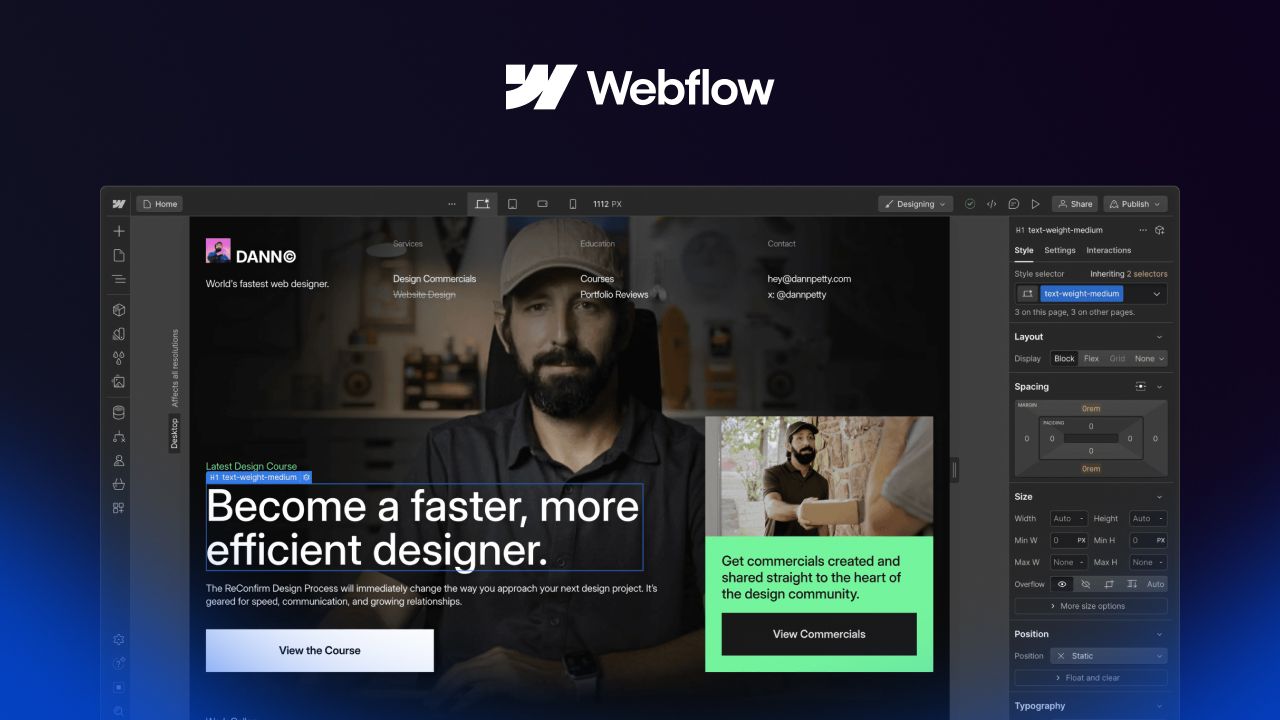
Webflow is a no-code web development platform for professionals and businesses who need complete website control. Unlike traditional site builders, Webflow combines a visual editor's simplicity with the flexibility of developer-level tools.
Why People Choose Webflow:
- Scalability: Webflow's CMS can handle everything from small blogs to content-heavy websites with thousands of pages.
- Creative Freedom: With no reliance on templates, Webflow lets you design from a blank canvas.
- Advanced Features: From the latest SEO tools to dynamic animations, Webflow is built for serious creators.
- Developer-Friendly: Embed custom HTML, CSS, or JavaScript, or use Webflow's API for advanced integrations.
Who is Webflow for?
- Creative Professionals and Agencies
- Businesses Focused on Scaling
- Marketers and SEO Professionals
- Developers or Pro-Code Users
2. What is Wix Studio?
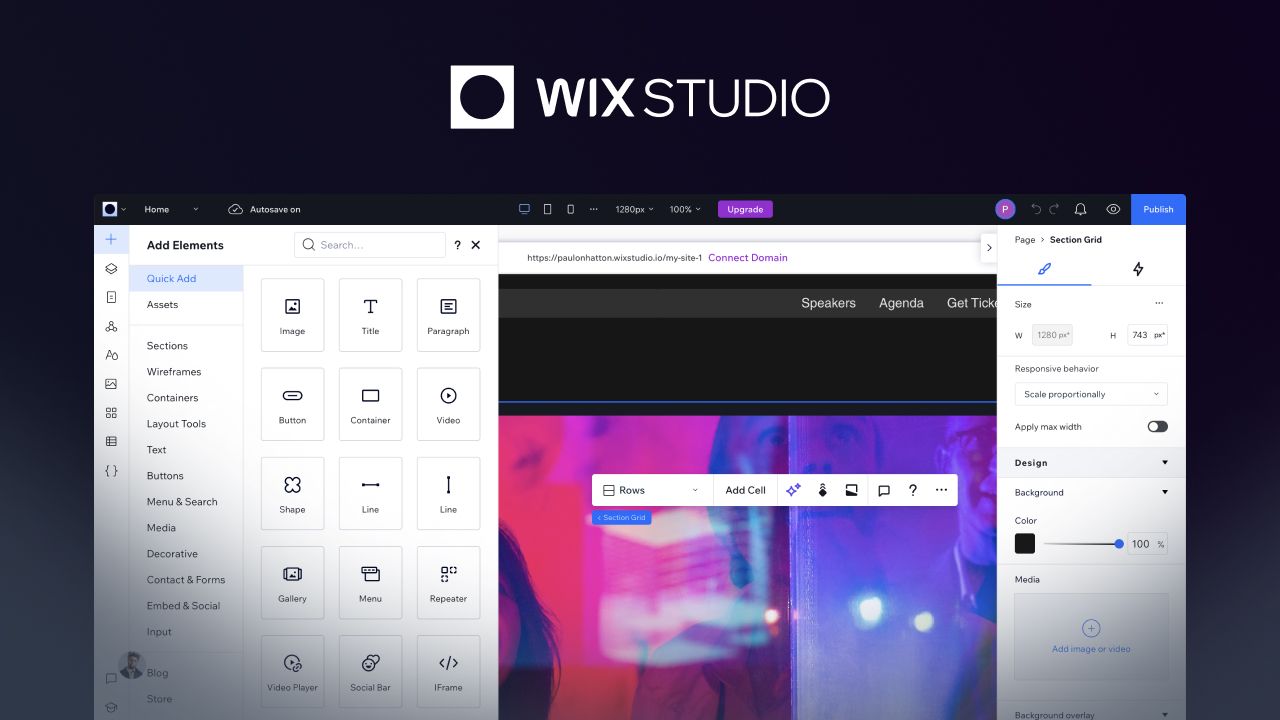
Wix Studio is Wix's latest platform designed to address the limitations of its standard editor and EditorX. It offers a blend of simplicity and advanced tools, aiming to attract both beginners and experienced designers.
Why People Choose Studio:
- Improved Customization: Studio bridges the gap between EditorX and Webflow and offers far better design flexibility than previous Wix tools.
- Simplified Complexities: While introducing more advanced features, Studio retains the intuitive drag-and-drop simplicity Wix is known for.
- Integrated Ecosystem: Wix Studio plugs straight into Wix's ecosystem, making it an easy upgrade for existing Wix users.
Who is Wix Studio for?
- Designers Within the Wix Ecosystem
- Small to Mid-Sized Businesses
- Freelancers Handling Quick Turnaround Projects
Projects that aren't focused on scalability and proper SEO practices are ideal for Wix's Studio.
3. Wix Editor vs Wix Studio: two products, two sets of plans
Wix sells two products. The Wix Editor is the standard editor, sold on Wix Premium plans. Wix Studio is the newer editor, sold on Studio plans. Wix's Help Center is plain about it: Premium plans are only for sites built on the Wix Editor, a site built in the Studio Editor needs a Studio plan, and each Premium plan covers one site.
Feature-by-Feature Comparison
When comparing Webflow and Wix, it's important to go beyond surface-level functionality and understand how each platform approaches crucial aspects of web design.
While I am a heavy Webflow user, I'll say that each tool has unique strengths and limitations. Let's dive in and I'll help you make the right decision.
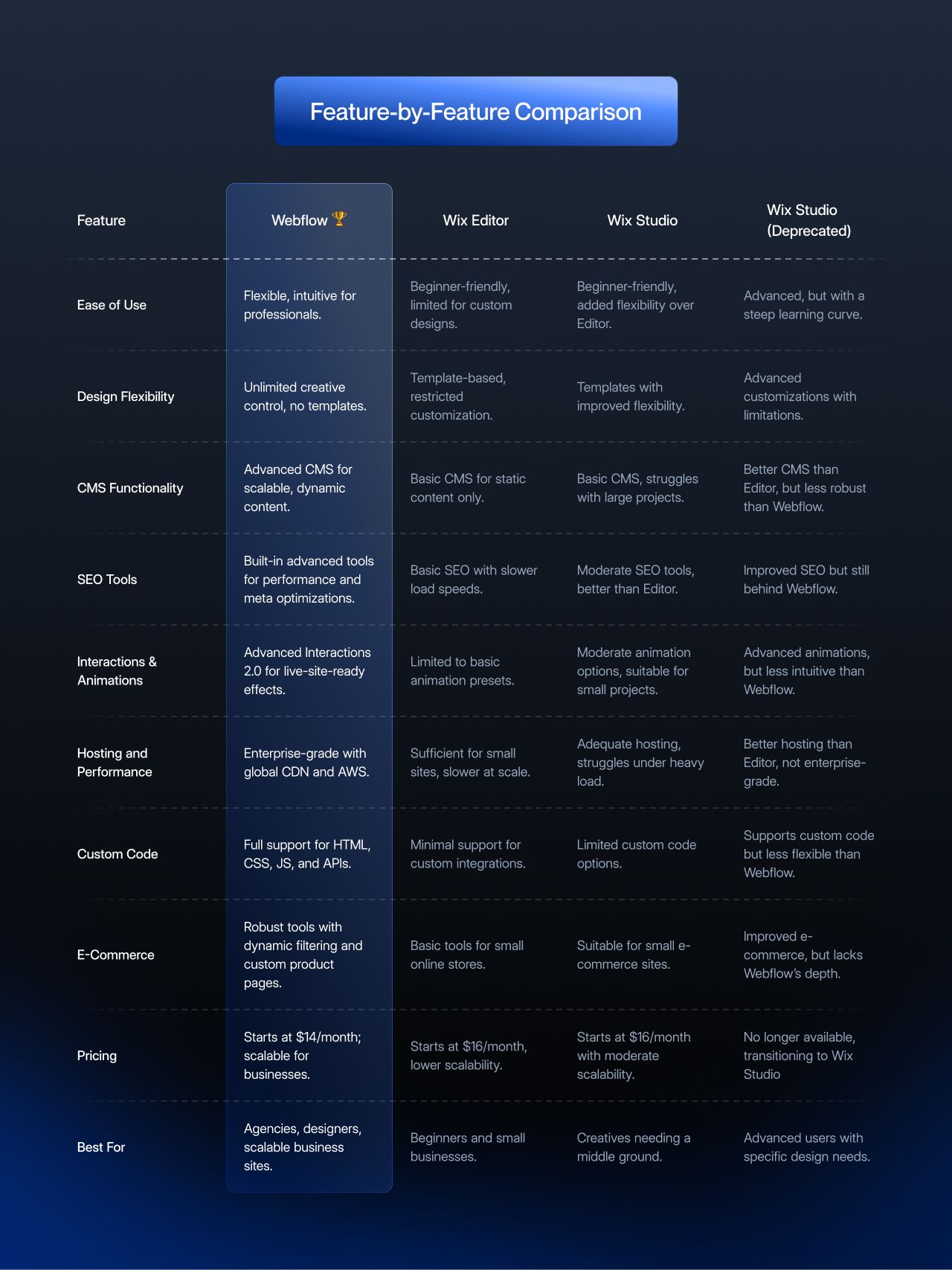
Feature | Webflow 🏆 | Wix Editor | Wix Studio | Wix EditorX (deprecated) |
|---|---|---|---|---|
Ease of Use | Flexible, intuitive for professionals. | Beginner-friendly, limited for custom designs. | Beginner-friendly, added flexibility over Editor. | Advanced, but with a steep learning curve. |
Design Flexibility | Unlimited creative control, no templates. | Template-based, restricted customization. | Templates with improved flexibility. | Advanced customizations with limitations. |
CMS Functionality | Advanced CMS for scalable, dynamic content. | CMS collections for dynamic pages. | Up to 10,000,000 CMS items on Elite. | Better CMS than Editor, but less capable than Webflow. |
SEO Tools | Built-in advanced tools for performance and meta optimizations. | Basic SEO with slower load speeds. | Moderate SEO tools, better than Editor. | Improved SEO but still behind Webflow. |
Interactions & Animations | Advanced interactions built on GSAP for live-site-ready effects. | Limited to basic animation presets. | Moderate animation options, suitable for small projects. | Advanced animations, but less intuitive than Webflow. |
Hosting and Performance | Enterprise-grade with a global CDN on AWS and Cloudflare. | Sufficient for small sites, slower at scale. | Adequate hosting, struggles under heavy load. | Better hosting than Editor, not enterprise-grade. |
Custom Code | Full support for HTML, CSS, JS, and APIs. | Minimal support for custom integrations. | Velo code (JavaScript, APIs, Node.js backend) that runs only on Wix. | Supports custom code but less flexible than Webflow. |
E-Commerce | Strong tools with dynamic filtering and custom product pages. | Basic tools for small online stores. | Built-in store for up to 50,000 products; payments from the Standard plan. | Improved e-commerce, but lacks Webflow's depth. |
| Code Export | HTML and CSS export on paid Workspace plans, without CMS content. | Not supported; the site stays on Wix. | Not supported; the site stays on Wix. | No longer available |
| Pricing | Paid site plans start at $15/month billed yearly; scalable for businesses. | Premium plans priced per site, lower scalability. | Starts at $19/month billed yearly, with moderate scalability. | No longer available, transitioning to Wix Studio |
| Best For | Agencies, designers, scalable business sites. | Beginners and small businesses. | Creatives needing a middle ground. | Advanced users with specific design needs. |
1. Ease of Use
Wix Studio builds on the simplicity of Wix Editor with enhanced flexibility. Its drag-and-drop interface is intuitive and a great choice for users upgrading from simpler tools. The learning curve is minimal, especially if you're familiar with Wix's ecosystem. Overall, it's ideal for small to mid-sized projects.
Webflow, in contrast, prioritizes professional-grade flexibility over simplicity. Its interface is designed for users who want total control over their designs and functionality.
While Webflow's learning curve is steeper, tools like Webflow University help you quickly bridge that gap. For professionals, the added complexity is worth scalability and creative freedom payoff.
2. Design Flexibility
Wix Studio introduces grid-based layouts, custom breakpoints, and improved responsiveness. These updates make it more adaptable than Wix Editor, but the platform still relies on templates and predefined elements
Webflow offers full design freedom, starting with a blank canvas instead of predefined templates. Your team can create pixel-perfect layouts, advanced animations, and fully custom interactions without restrictions.
3. CMS and Scalability
Wix Studio improves on the basic CMS capabilities of Wix Editor. You can now manage dynamic content like blogs or small catalogs. However, it struggles with larger-scale projects, making it less suitable for businesses anticipating growth. Item caps are high: Plus allows 20,000 CMS items and Elite 10,000,000.
Webflow's CMS is built for scalability. You can create and manage thousands of content items with dynamic relationships, automate workflows using tools like Zapier, and integrate external databases like Airtable.
4. SEO and AEO
Wix Studio takes a step forward over Wix Editor, meta tag editing, sitemaps, basic schema. The underlying code is still heavier than Webflow's, and Wix Studio sites consistently score 15 to 25 points lower in Lighthouse than equivalent Webflow builds we audit at LoudFace.
Webflow is built for SEO at the platform level. Clean semantic HTML, server-rendered CSS, lightning page weights when the site is built well. You can edit every meta tag, sitemap entry, canonical URL, and robots directive without touching code. JSON-LD schema goes anywhere on any element.
The bigger gap shows up in AEO, getting cited by ChatGPT, Claude, Perplexity, and Google's AI Overviews. Webflow's clean HTML output and schema flexibility mean LLMs can actually parse and cite Webflow pages reliably. We've seen client sites move from zero ChatGPT mentions to consistent citations within a quarter of switching from a Wix-family platform to Webflow. The Wix Studio markup wraps content in enough wrapper divs that some AI engines simply skip it during extraction.
If your site has any organic growth ambition past "we have a presence on the web," Webflow is the answer.
5. Interactions and Animations
Wix Studio introduces animations and transitions but remains limited to basic presets. While suitable for visually appealing static sites, it lacks the sophistication needed for immersive, interactive experiences.
Webflow's interactions, now built on GSAP, let designers create production-ready animations, such as hover effects, parallax scrolling, and scroll-triggered interactions. These tools have allowed us to build highly engaging user experiences for our clients.
6. Hosting and Performance
Wix Studio provides decent hosting options suitable for small to medium-sized projects. However, it's not optimized for high-traffic scenarios, and performance can suffer during peak loads.
Webflow's hosting is powered by AWS and Cloudflare, delivering enterprise-grade speed and reliability. Its global CDN ensures fast load times for users worldwide, even under heavy traffic.
7. Custom Code and Developer Tools
Wix Studio's custom code runs through Velo, Wix's developer platform. You can embed HTML and CSS snippets, and Velo adds JavaScript, APIs, and a full server-side runtime based on Node.js. Developers can work in the VS Code-based Wix IDE or connect the site to GitHub and use their own tools. The catch is where the code lives: all of it runs on Wix's cloud, and a Wix site can't move to another platform.
In Webflow, developers can embed custom HTML, CSS, and JavaScript or use Webflow's API to create complex workflows.
8. E-Commerce Capabilities
Studio's e-commerce runs on Wix Stores, which takes up to 50,000 products, so catalog size is rarely the limit. The difference is design control: Webflow offers customizable product pages, dynamic filtering, and integration with payment gateways, making it the stronger pick for a custom-designed store.
However, for dedicated e-commerce, Shopify might still be a better option than either of these.
9. AI features: Wix AI vs Webflow AI
Both platforms now build a site from a prompt. Wix's AI website builder promises to "Go from a prompt to a business-ready website", and you keep customizing by hand or with Aria, Wix's built-in AI agent. Inside Wix Studio, the AI tools include responsive AI that adjusts sections to every screen size in one click, an AI code assistant in the VS Code-based IDE, an AI text generator, and image tools for upscaling, background removal, and text to image.
Webflow's AI site builder generates an entire website with a scalable design system in minutes. Webflow AI also runs sitewide audits with AI-generated suggestions to improve SEO and AEO, and Webflow's MCP server connects your site to AI tools like Claude and Grok Build. Usage runs on AI credits, which come with every Workspace plan (200 to 400 a month on self-serve Workspaces).
My take: the AI that edits your site matters less than whether AI engines can read the result. A prompt-built page that gets skipped during extraction does nothing for your citations, which is the SEO and AEO gap covered above.
10. Code Export and Ownership
Webflow lets you export clean, semantic HTML and CSS files on any paid Workspace plan. The export covers static pages only. CMS items aren't in the code export, and Webflow says dynamic content must be exported on a collection-by-collection basis.
Wix has no site or code export. Its own Help Center says you can't download or export Wix templates, sites must be hosted and operated on Wix's servers, and a Wix site can't be transferred to another platform, so you recreate it by hand. Wix Blog posts can't be exported to other platforms either. That lock-in is the real cost of leaving Wix, and it's why every switch to Webflow below starts with an audit and a rebuild.
Webflow vs Wix Studio pricing breakdown
Pricing is the cleanest place to start a comparison because both platforms publish their site plans transparently. Both gate features by tier: Webflow's Basic plan has no CMS, and Wix Studio's Basic plan can't accept payments. Every price in the table is per site, billed yearly.
| Plan tier | Webflow site plan | Wix Studio plan |
|---|---|---|
| Starter / Free | Starter: free (webflow.io subdomain, 2 static pages) | Free to build; you pay when you upgrade a site |
| Entry | Basic: $15/mo (300 static pages, no CMS) | Basic: $19/mo (1,500 CMS items, can't accept payments) |
| Standard | Premium: $25/mo (20,000 CMS items, 40 Collections, 50 GB bandwidth); higher bandwidth tiers cost more | Standard: $27/mo (4,000 CMS items) |
| Mid | No self-serve site plan between Premium and Team | Plus: $34/mo (20,000 CMS items) |
| Top | Team: $2,500/mo (annual contract); Enterprise: custom | Elite: $159/mo (10,000,000 CMS items); Enterprise: custom |
Webflow bills in two layers. The site plan above pays for hosting one site. A Workspace plan, billed separately, pays for the seats and tools around your sites. Every Workspace tier, the free Starter included, supports unlimited paid site plans. Workspace prices are billed yearly. For freelancers and agencies, Starter is free, Freelancer is $16/mo (10 staging sites, client payments) and Agency is $35/mo (unlimited staging sites, 3 free client seats per site). In-house teams use Core ($19/mo) or Growth ($49/mo). Extra seats cost $39/mo per full seat and $15/mo per limited seat.
The Team plan ($2,500/mo, annual contract required) is a platform plan for in-house teams that need more control: Webflow Localize, publishing workflows, 5 full seats and 5 limited seats. Agencies don't need it to run client sites; the Agency Workspace covers that. Enterprise sits above Team with custom pricing.
Bandwidth is the other difference. Webflow meters it: Premium bandwidth is tiered from 50 GB up to 2.5 TB a month, and two consecutive months over the limit trigger an automatic plan upgrade. Every Wix Studio plan lists unlimited bandwidth.
Pricing snapshot per webflow.com/pricing and the Wix Studio plans page as of October 2026, with Wix Studio prices paid in full up front; per-plan numbers shift quarterly so cross-check the live pages before committing budget. The headline: Webflow's standard site plans run cheaper at the entry tier. At the top end both sell custom-priced Enterprise tiers, and the Studio workspace itself is free; you pay per site.
Webflow vs Wix Studio for e-commerce
E-commerce is where the two platforms diverge most. Webflow Ecommerce supports up to 5,000 ecommerce items on the Plus plan ($74/mo, billed yearly) and 15,000 on Advanced ($212/mo). It handles custom checkout flows via custom code, integrates with Shopify and Foxy if you need to outgrow the native cart, and runs faster than most templated stores because it ships clean static HTML.
On Wix Studio, a site can accept payments from the Standard plan ($27/mo) up; Basic sites can't. Wix Stores takes up to 50,000 products, so the platform suits direct-to-consumer brands of most catalog sizes that prioritize built-in marketing automation over checkout customization. For B2B SaaS billing flows (subscriptions, usage-based pricing, complex tax logic), neither platform is the right home, that's where you bolt on Stripe Billing or Chargebee on top of either CMS.
Bottom line: Webflow Ecommerce wins on design freedom and page speed; Wix Studio Stores wins on time-to-launch and built-in marketing tooling. Neither is the right substrate for a B2B SaaS billing stack, that lives in your product app, with the marketing site doing the conversion work.
Switching from Wix's Studio to Webflow
1. When to switch from Studio to Webflow?
You have outgrown Studio's lack of flexibility. Studio undoubtedly provides more flexibility than Wix Editor. However, while functional, these tools lack the sophistication required for large-scale or complex projects.
You now need to scale your content and website features. As your content grows, whether it's a blog, portfolio, or product catalog, Studio's CMS begins to show its limitations. It's suitable for small to mid-sized projects but struggles with complex content models or frequent updates.
With Webflow's CMS, you can manage thousands of items effortlessly, automate updates, and integrate with external tools like Airtable or Zapier.
You need advanced interactivity, animations and a better UX. Modern websites must do more than look good. They must engage users with dynamic, interactive elements. Studio offers basic animations but doesn't support advanced interactions like scroll effects or parallax animations.
You now need to grow your brand and want to prioritize SEO and performance. Studio improves Wix Editor's SEO features but still falls short of Webflow's advanced tools. The heavier code and slower loading times of Studio can hinder SEO performance, particularly for competitive industries.
2. How to switch from Studio to Webflow?
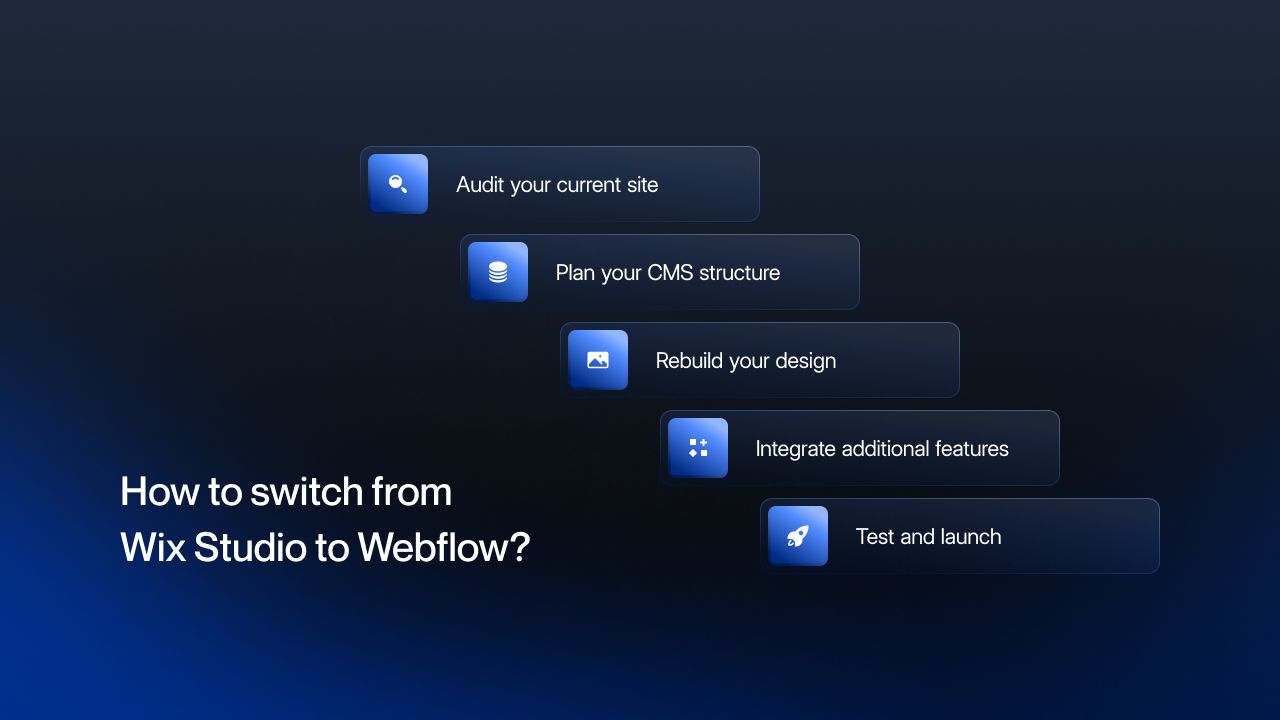
Step 1: Audit Your Current Site
List all pages, features, and content you want to replicate or enhance in Webflow. This helps you identify areas for improvement and plan your migration.
Step 2: Plan Your CMS Structure
Webflow's CMS allows for dynamic content relationships, so plan your collections (e.g., blog posts, products, team profiles) to optimize your workflow.
Step 3: Rebuild Your Design
Recreate and improve your existing site in Webflow's Designer.
Step 4: Integrate Additional Features
Add the integrations and features your Webflow build needs, such as API connections, custom workflows, or e-commerce.
Step 5: Test and Launch
Use Webflow's staging environment to test your site for performance, SEO, and responsiveness. Once everything is in place, launch your site confidently.
LoudFace Makes Migration Easy
Migrating from Wix Studio to Webflow can feel overwhelming, but it's a smooth transition with the right partner. At LoudFace, we run dual-track SEO + AEO programs for B2B SaaS companies (Webflow is one delivery layer). Book a Free Consultation and let us help you get more from your website.
Webflow vs Studio: Strengths and Weaknesses
Every platform has its pros and cons, and choosing the right one means understanding how their strengths and weaknesses align with your needs. Here's a clear breakdown of where Webflow and Wix Studio shine, and where they fall short.
Webflow's Strengths | Webflow's Weaknesses |
|---|---|
Creative freedom | Learning curve |
| Scalability | Cost |
Advanced tools | Overkill for simple projects |
SEO and performance | |
| Custom code |
Wix Studio's Strengths | Wix Studio's Weaknesses |
|---|---|
Ease of Use | Limited scalability |
Improved flexibility | Performance |
Familiar ecosystem | Custom code locked to Wix |
| Quick setup | Not future proof |
When to choose Webflow vs Wix Studio
Choose Webflow if:
- You're building a B2B SaaS marketing site that needs a large, complex content library.
- SEO performance and Core Web Vitals are non-negotiable, Webflow's static HTML output ranks faster than Wix's hybrid rendering.
- You want full custom code freedom (head, body, page-level) without restrictions.
- You're an agency managing multiple client sites and need the Agency Workspace (unlimited staging sites, client seats on every site).
- You'll integrate with a marketing stack (Segment, HubSpot, Salesforce) where a developer-facing CMS matters.
Choose Wix Studio if:
- You're a freelancer or small agency shipping small, simple client sites.
- You want native e-commerce, booking, or appointment scheduling without third-party integrations.
- Your clients want to edit content themselves in a familiar Wix-style editor.
- Time-to-launch is the primary constraint and you can trade some design freedom for speed.
- You're already in the Wix ecosystem (Studio plans inherit existing Wix domain and email setups).
Working on a B2B SaaS or fintech growth program? We run a free 30-minute AI citation audit. We open the dashboard, walk through the prompt graph for your category, and tell you what's working (or who else can help). See our public pricing first if that helps.