
The Complete Guide to Answer Engine Optimization (AEO) in 2026
A tactical guide to getting your B2B SaaS brand cited by ChatGPT, Google AI Overviews, Perplexity, and Claude inside AI-generated answers in 2026.
Answer engine optimization (AEO) is how a brand gets cited in ChatGPT, Perplexity, Claude, and Google AI Overviews answers. In 2026 it comes down to answer-first page structure, schema that matches what engines extract, entity consistency, and measuring share of answer instead of rankings. Everything here is tested across 75 buyer prompts we track daily.
On this page
- What is Answer Engine Optimization?
- Answer engine optimization strategies for 2026
- How AEO differs from SEO, GEO, and AI SEO
- How is search changing in 2026?
- What are the five forces reshaping search?
- How do you measure AEO performance?
- How do LLMs pick which brands to cite?
- What does a citation-ready website require?
- How does E-E-A-T apply to AEO?
- What are the biggest AEO mistakes to avoid?
- What's next for AEO in 2026–2027?
- How LoudFace runs AEO for B2B SaaS clients
- Sources and further reading
- Further reading
- Frequently Asked Questions
Last updated: May 2026. Answer Engine Optimization (AEO) means structuring your content so ChatGPT, Claude, Perplexity, and Google AI Overviews cite your brand when they answer buyer questions. In 2026, three structural moves separate cited pages from invisible ones: a 40–60 word direct-answer block at the top of every major section, FAQPage schema with question-shaped headings, and named-entity density in the first 500 words. We track Share of Answer across 75 buyer prompts on ChatGPT, Claude, and Perplexity. The brands cited are the ones doing all three.
The playbook we run for B2B SaaS clients. It replaces ranking with citation as the core metric. The work is prompt research, extractable content, schema markup, and third-party placements on sources the models already trust.
Key takeaways
- Share of Answer is the new metric. Across a tracked prompt set, what % of AI answers name your brand. Target 30% by month six.
- Citation logic differs by engine. Google AI Overviews favors top-10 ranked pages. ChatGPT pulls from Bing + partnerships. Perplexity rewards freshness. Claude is the most conservative. Gemini leans on Reddit and YouTube.
- Review sites and forums drive ~50% of B2B SaaS citations. G2, Capterra, TrustRadius, and the right Reddit threads outrank most owned content.
- Your own domain caps near 15% of citations. That's a source-diversity feature of how LLMs build answers, not a content-quality problem.
- Direct-answer blocks + FAQPage schema + named-entity density are the three structural moves cited pages share.
What is Answer Engine Optimization?
Answer Engine Optimization (AEO) is the practice of structuring a site so that ChatGPT, Claude, Perplexity, Google AI Overviews, and Gemini cite the brand when they answer category-relevant buyer questions. The metric being optimized for is citation rate inside generated answers, not blue-link rank on a search engine results page. The deliverable is a measurable percentage of tracked prompts on which the brand appears as a named source.
This is a different discipline from classical SEO. SEO targets a position on a results page that a human user clicks. AEO targets selection inside an answer the model writes before the user sees a list of links. SEO ranks pages. AEO selects sources. A site can rank top three on Google for a query and still get cited zero percent of the time on the equivalent ChatGPT prompt, because the citation logic is not the ranking logic.
Three structural moves separate cited pages from invisible ones in 2026:
- A 40 to 60 word direct-answer block sitting at the top of every major section, immediately after the heading.
- FAQPage schema with question-shaped H2s that match how buyers actually phrase prompts.
- Named-entity density in the first 500 words, so the model can disambiguate the brand from competitors and resolve it against a knowledge graph.
If a site does not do all three, it is not running AEO. It is running SEO and hoping the models notice.
Answer engine optimization strategies for 2026
- Direct-answer blocks. Write the first sentence after every H2 as a self-contained 40–60 word answer. If a model screenshot-quoted that single block, it should tell the reader what they came for.
- FAQPage schema with question-shaped headings. Wrap reference questions in valid schema.org/FAQPage markup so LLM crawlers can parse them without interpreting the HTML.
- Named-entity density in the first 500 words. Mention 5–10 competitors, tools, or category leaders by name early. Fan-out queries land on pages that already say the entity names.
- Year-stamped freshness. Put 2026 in the title, H1, and 2–3 H2s. Perplexity and ChatGPT browse mode weight recency aggressively.
- Internal link clustering. Three to five links from a page into the rest of your topical content. LLM crawlers read this as canonical-answer signal.
- Comparison tables. Structured side-by-side data that AI engines extract cleanly. Source type, share, example domains, action, all in one table.
- Real client outcomes with named figures. Anonymous case studies get discounted. Named clients with dollar figures and live-site links carry the highest E-E-A-T weight in B2B.
Google AI Overviews: Share of Queries by Month, 2025
Share of queries (%)
AI Overviews prevalence across 10M+ keywords tracked by Semrush, January–November 2025.
Conversion premium: AI-referred vs. traditional organic
LLM-referred traffic converts far above organic averages, Semrush measured 4.4x, Ahrefs measured 23x on its own site.
Source: Semrush AI search SEO traffic study; Ahrefs AI search traffic conversions report
How AEO differs from SEO, GEO, and AI SEO
Answer engine optimization is a B2B-native discipline because B2B buyers research before they buy, and they increasingly do that research inside an AI assistant. A SaaS CEO asking ChatGPT "best CRM for a 50-person sales team" sees three vendors named, cites two sources, and closes the tab. The vendors named win the shortlist. Everyone else is invisible.
The acronym soup is confusing on purpose because vendors sell against each label. Cut through it:
- SEO optimizes for traditional search engine rankings on Google and Bing.
- AEO (answer engine optimization) optimizes for being cited inside AI-generated answers. This is the term we use.
- GEO (generative engine optimization) is a synonym for AEO coined by a Princeton and Georgia Tech paper in 2023. Same practice, different label.
- AI SEO is a marketing term covering both.
Underneath the labels, the work is the same: identify the prompts your buyers ask, measure how often your brand appears in the answers, and improve the answer sources so your brand appears more often.
How is search changing in 2026?
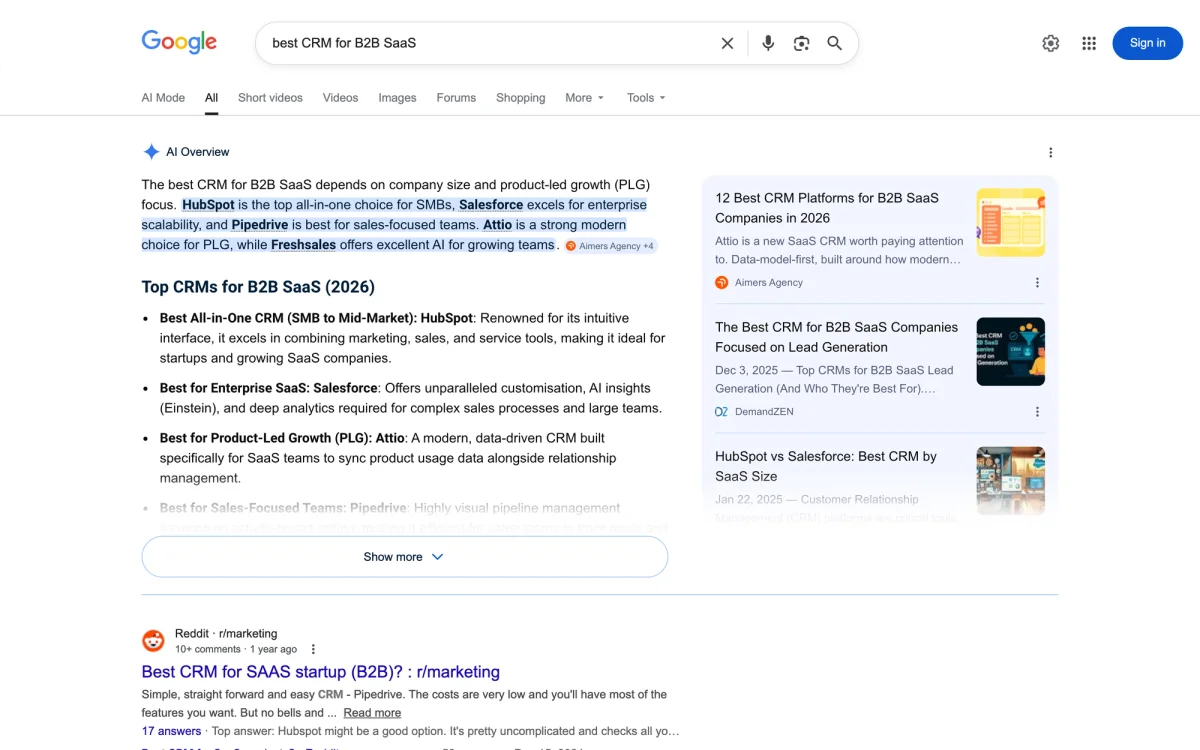
A Google search for "best CRM for B2B SaaS" in 2023 returned ten blue links. The same query in April 2026 returns an AI Overview that names three products, a "People also ask" block, four sponsored results, and the ten blue links pushed below the fold. The same query in ChatGPT returns a ranked list of five products with citations. The same query in Perplexity returns a synthesized answer with eight source links.
Four numbers frame the shift.
- Semrush's study of 10M+ keywords, refreshed through November 2025, tracked AI Overviews peaking at 24.61% of queries in July 2025 before settling at 15.69% in November, up from 6.49% in January. Science (25.96%), Computers & Electronics (17.92%), and People & Society (17.29%) are the most saturated industries.
- OpenAI confirmed 800 million weekly active users for ChatGPT in October 2025, up from 300 million a year earlier. Google's Gemini crossed 400 million monthly users per Alphabet's Q4 2025 earnings.
- Semrush's AI search traffic study across 500+ B2B topics found the average LLM-referred visitor is worth 4.4x a traditional organic visitor on conversion rate. Ahrefs reported a sharper version on its own site: 0.5% of traffic from AI sources drove 12.1% of signups in a 30-day window, a 23x conversion premium.
- Adobe's Q2 2026 AI traffic report measured AI-driven traffic to US retail sites up 393% year-over-year in Q1 2026, and up 693% during the 2025 holiday season. The B2B numbers lag retail, but the curve is the same shape.
Organic traffic still pays for most B2B pipelines. What has changed is that a second stack now sits on top of SEO, and the rules are different. AI engines do not rank ten blue links. They pick two or three brands to name, and they build those answers from sources they trust. Getting picked is a different job than getting ranked.
Where B2B SaaS Citations Come From (Source-Type Breakdown)
Source type
Share of citations by source type across 400+ audited AI answers on B2B SaaS buyer queries, 2025–2026.
Source: LoudFace audit of 400+ AI answers across ChatGPT, Perplexity, Claude, and Google AI Overviews
What are the five forces reshaping search?
1. Answer replaces ranking
Google launched AI Overviews to all US users in May 2024 and expanded to 100+ countries by late 2025. Google AI Mode, a ChatGPT-style conversational search, rolled out to all US users in early 2026. The ten blue links still exist but increasingly sit below a generative answer.
The downstream effect on click-through is documented. A Semrush and Datos study of 260 billion clickstream events in 2024 found 58.5% of Google searches end without a click. When AI Overviews trigger, organic click-through on informational queries drops further, Ahrefs measured a 34.5% reduction in CTR on queries where AIO appears.
What used to be "rank in the top three" is now "get named inside the answer block."
2. Source diversity has collapsed
Traditional search rewarded breadth. A decent blog post could rank for hundreds of long-tail queries and pull traffic from all of them. AI answers narrow the aperture. Most AIO blocks cite three to eight sources. ChatGPT web-search responses cite four to six. Perplexity cites eight to fifteen but weights the top three.
Being in the source set is binary. You are in the answer or you are invisible. We broke down why so many B2B sites stay invisible in AI search in a recent live session, including the 3-step audit we run and how Toku reached 86%.
3. Citation logic differs by platform
This is the single most misunderstood point in the field. Every LLM picks sources differently, and the right strategy depends on which engine drives your buyers.
- Google AI Overviews pulls almost exclusively from pages that already rank in the top ten for the underlying query. Traditional SEO fundamentals still win here.
- ChatGPT (with browsing and in training data) cites a wider spread, including lower-ranking pages, Reddit threads, YouTube transcripts, and community content. OpenAI's SearchGPT documentation confirms reliance on Bing's index plus direct partnerships with publishers.
- Perplexity favors fresh, primary-source content and academic papers. It cites less-authoritative-looking sources more readily than Google.
- Claude (via Anthropic's Projects and web search) leans heavily on domain-authority signals and primary sources. It is the most conservative citer.
- Gemini pulls from Google's index with a preference for Reddit, YouTube, and Google-owned properties like Quora answers and Google Scholar.
One page can rank on Google and never appear in ChatGPT. Another can show up constantly in Perplexity and never in AIO. A cross-platform strategy is not optional.
4. Share of Answer replaces Share of Voice
For twenty years, SEO measured Share of Voice: the percentage of clicks a site captured across a keyword set. That metric no longer tells you the thing you need to know.
The new metric is Share of Answer: across a tracked set of buyer prompts, in what percentage of answers is your brand named, quoted, or linked? If a SaaS CEO asks ChatGPT "best B2B CRM for a 50-person sales team" and the answer names Salesforce, HubSpot, and Pipedrive, those three own the Share of Answer for that prompt. Everyone else is invisible.
Tools that measure this in 2026 include Profound, AthenaHQ, Otterly, and Peec AI. Each runs prompts across the major engines on a cadence and reports appearance rates and sentiment.
5. The citation economy has real business value
Named mentions in AI answers are not a vanity metric. Three data points:
- A Gartner forecast projects traditional search volume will drop 25% by 2026 as users migrate to AI assistants.
- Semrush's 4.4x conversion-rate advantage on LLM-referred traffic over traditional organic, validated at 23x on Ahrefs' own site.
- Menlo Ventures' 2025 State of GenAI report documented $37 billion in enterprise GenAI spending, a threefold increase year over year, with Anthropic capturing 40% of enterprise LLM spend.
The buyers in the second number are asking the assistants in the third number to decide which vendors to consider. The companies named inside those answers win.
How do you measure AEO performance?
Everything below only matters if you can measure it. Before writing a single page, instrument the program.
The four-step setup
- Build the prompt set. Forty to sixty prompts across three layers: top of funnel ("what is AEO"), middle ("best AEO agencies for fintech"), and bottom ("AEO vs SEO which is better for B2B"). Pull them from sales call transcripts, support tickets, and Google Search Console queries.
- Pick the engines. ChatGPT, Google AI Overviews, Perplexity, Claude, Gemini. Weight by your buyer mix, a US SMB program weights ChatGPT and Google heavily, an enterprise program weights Claude more.
- Pick the tool. Profound, AthenaHQ, Otterly, or Peec AI. All run prompts on a daily or weekly cadence and output appearance rate, sentiment, and source URLs. Budget $300–$1,500/month depending on prompt volume.
- Establish the baseline. Run the full set once. Record appearance rate per engine, top competitors named, and which URLs get cited. This baseline is the only honest measure of whether the program works.
The five metrics that matter
- Share of Answer. Percentage of tracked prompts where your brand appears. A healthy B2B program targets 30% by month six.
- Citation rate. When your brand is named, how often is a URL from your domain linked. Names without citations do not compound.
- Competitive positioning. Of the brands named alongside yours, who appears most often. This is your real competitive set, not the one sales thinks they have.
- Sentiment. How the answer frames your brand. "X is the leader" versus "X is a smaller option" moves pipeline.
- Prompt coverage by funnel stage. Bottom-funnel prompts convert. Top-funnel prompts build awareness. An AEO program weighted only to top-funnel is a blog in disguise.
Benchmark: where B2B SaaS citations actually come from
To make Share of Answer concrete, look at where the citations come from, not who currently wins the agency listicle race. We audited 400+ AI answers across ChatGPT, Perplexity, Claude, and Google AI Overviews on B2B SaaS buyer queries over the last twelve months and counted the source type behind every cited URL.
| Source type | Share of citations | Example domains | How to earn a slot |
|---|---|---|---|
| Review platforms | ~28% | G2, Capterra, TrustRadius, Gartner Peer Insights | Reviews, category pages, comparison entries |
| Community and forums | ~22% | Reddit, Hacker News, Indie Hackers, Quora | Authentic participation, not marketing drops |
| Editorial and trade media | ~18% | TechCrunch, The Verge, Forbes, trade publications | PR, contributor columns, product launches |
| Vendor blogs and docs | ~15% | Your own domain, partner blogs, documentation | Extractable content with JSON-LD |
| Independent analysis | ~10% | Substacks, personal blogs, analyst notes | Relationship-building with category writers |
| Primary research and data | ~7% | Academic papers, benchmark studies, surveys | Publish proprietary data other people cite |
Three things to pull from the distribution.
Review platforms and community forums together account for roughly half of all citations. G2, Capterra, TrustRadius, and the right Reddit threads are the shortest path to appearing in AI answers for most B2B SaaS categories. A single well-placed Reddit thread can outperform six months of your own blog output on the same category question.
Editorial and independent analysis (~28% combined) reward pitch work more than content volume. Getting named in a TechCrunch piece, a Forbes contributor column, or a well-read Substack converts into ongoing citations every time the model is asked the adjacent question. This is the slot most B2B SaaS teams underinvest in.
Your own domain caps around 15% of citations no matter how much content you publish. The ceiling is a source-diversity feature of how LLMs build answers, not a content-quality problem. If your entire AEO program is on-domain content, you are optimizing for the smallest slice of the citation pie.
Most AEO agencies publish content for the 15%. Very few do the engineering work that decides whether that content gets crawled in the first place, or the placement work that moves the other 85%. That is the lane LoudFace runs. Our clients arrive on Webflow or moving to Next.js, with a technical AEO problem sitting under the content problem. LoudFace was built for it.
How do LLMs pick which brands to cite?
We have audited over 400 AI answers across client and competitive queries in the last twelve months. The patterns keep repeating, enough that I stopped being surprised by them.
In June 2026 we turned that audit into a full dataset. Our B2B SaaS AI-Citation Benchmark measured 160,240 citations across 23,545 AI answers for five B2B SaaS brands. The headline: company websites win 50.7% of all citations, but Reddit is the single most-cited source, and that is almost entirely a ChatGPT effect. The rules below are what that data shows.
Rule 1: Primary sources beat secondary sources
When an answer needs a statistic, the model reaches for the original source. A KPMG report wins over any blog quoting KPMG. Same story for the Menlo Ventures PDF versus a marketing-blog summary, or a company's own pricing page versus a third-party comparison.
So if you cite a stat, link to the source and publish your own primary data where you can. A proprietary benchmark, a customer survey, or a usage study from inside your product gets cited directly.
Rule 2: Freshness matters, unevenly
Perplexity and ChatGPT browse mode heavily weight recency, a post dated March 2026 beats a post dated 2023 on the same topic, even if the older post has more backlinks. Claude and Google AI Overviews care less about publish date and more about domain authority.
If your buyers live in ChatGPT and Perplexity, refresh cadence beats backlink count. Update the most-cited pages every 60–90 days and surface the "last updated" date in both the HTML and the structured data.
Rule 3: Structured data tells the model what the page is
JSON-LD structured data does two things. It tells search engines what entity a page describes (organization, article, product, FAQ). It also gives LLM crawlers a machine-readable summary they can parse without interpreting the HTML.
On LoudFace client sites (Next.js App Router), we ship these schemas on every article page. Author is Person, not Organization, personal bylines outperform corporate bylines in every E-E-A-T audit we run.
{
  "@context": "https://schema.org",
  "@type": "Article",
  "headline": "The complete guide to answer engine optimization in 2026",
  "datePublished": "2026-04-21",
  "dateModified": "2026-04-21",
  "author": {
    "@type": "Person",
    "name": "Arnel Bukva",
    "jobTitle": "Founder",
    "worksFor": { "@type": "Organization", "name": "LoudFace" },
    "url": "https://loudface.co/about/arnel-bukva",
    "sameAs": [
      "https://www.linkedin.com/in/arnelbukva/",
      "https://x.com/arnelbukva"
    ]
  },
  "publisher": {
    "@type": "Organization",
    "name": "LoudFace",
    "url": "https://loudface.co",
    "logo": { "@type": "ImageObject", "url": "https://loudface.co/logo.png" }
  },
  "about": { "@type": "Thing", "name": "Answer engine optimization" }
}
Reference pages ship FAQPage schema alongside (full example in the FAQ section below). Product and service pages ship Service or Product. The homepage ships Organization and WebSite with a SearchAction. Google publishes the full structured data reference and ChatGPT's crawler respects the same schemas.
Rule 4: Extractable answers outrank narrative
AI engines cite sentences, not essays. A wall of prose forces the model to paraphrase you. A clearly marked H2 followed by a direct, self-contained first sentence lets it quote you instead.
Write every major section so the first sentence after the heading stands on its own as an answer. If someone screenshotted that single sentence, it should tell them what they wanted to know.
This rule alone accounts for half the gap between cited and uncited pages we audit. FAQ sections are one of the highest-leverage places to apply it; see how to write FAQs that AI search engines actually extract.
Rule 5: Third-party citations compound
Getting cited in a listicle on a domain the LLM already trusts compounds faster than publishing on your own domain. LLMs weight cross-domain agreement: if five sources name the same three brands in the same category, those three brands dominate the answer.
One earned or paid slot on a G2, Capterra, Built In, or trade-press roundup can outperform a new blog post on your own domain. List the top-cited domains for your category (the tool set above finds them), then bake placement into the quarterly plan.
What does a citation-ready website require?
Most AEO advice stops at content. This is where we spend half our time on client engagements, because a well-written page on a broken site does not get crawled.
Crawl access for AI bots
In 2026, at least six crawlers matter: GPTBot (OpenAI), ClaudeBot (Anthropic), PerplexityBot, Google-Extended (Gemini training), Applebot-Extended, and Bingbot (powers ChatGPT search). Check robots.txt and make sure none are blocked. The Dark Visitors directory tracks the full list.
The most common failure we see is a site that blocks AI bots in robots.txt for "data protection," then wonders why no LLM cites it. The tradeoff is real. Blocking GPTBot keeps your content out of training sets. Make that call deliberately instead of letting it ship as the developer default.
Rendering
ChatGPT's SearchGPT crawler and Perplexity both execute JavaScript, but imperfectly. Single-page apps that render content client-side miss citations compared to server-rendered pages. On Next.js, this means App Router with Server Components and metadata exported via the Metadata API. On Webflow, it means staying on static HTML output and avoiding client-side content injection.
Test with URL Inspection in Google Search Console and the Perplexity URL test directly. If the rendered content matches the raw HTML, the site is crawler-friendly.
Site architecture
Three signals AI crawlers read from site architecture:
- Internal linking. Pages that multiple other pages link to, with descriptive anchor text, get treated as canonical answers.
- Breadcrumbs.
BreadcrumbListschema tells models where a page sits in the hierarchy. - Sitemap hygiene. A clean XML sitemap with
lastmoddates helps crawlers prioritize recent content.
Performance
Core Web Vitals still matter for Google indexing, which still feeds AI Overviews. Aim for LCP under 2.5 seconds, INP under 200 milliseconds, CLS under 0.1. Next.js with image optimization and edge rendering hits this with no special effort. Webflow hits it with proper image handling and lazy-loading.
How does E-E-A-T apply to AEO?
Google's experience-expertise-authoritativeness-trustworthiness framework is the same framework LLMs approximate when they pick sources. The signals are not mysterious.
- Author bylines with a real person, a headshot, and a link to a profile page with bio, credentials, and other writing. LLMs read author schema. A page attributed to "Admin" or "The Team" is a demotion signal.
- Company identity. An About page with founders, team, office locations, and funding. An Organization schema block with
sameAslinks to LinkedIn, Crunchbase, GitHub, and Wikipedia if you have one. - Case studies with named clients. Anonymous case studies get discounted. Named clients with dollar figures linked to the client's live site are the highest-trust content format in B2B. The format compounds into AEO. LLMs cite case study pages when a user asks "who has done this before," and a real, specific engagement out-ranks a generic capabilities page for those prompts every time.
- Third-party validation. Reviews on G2, Capterra, Clutch; media mentions; podcast appearances; conference talks. Each is a
mentionsignal for Organization schema. - Policy and trust pages. Terms, privacy, accessibility, security. Thin or missing trust pages correlate with lower Share of Answer in every category we have audited.
AI-Driven Traffic Growth to US Retail Sites
Year-over-year growth (%)
B2B numbers lag retail but follow the same curve. Adobe Q2 2026 AI Traffic Report.
Source: Adobe Q2 2026 AI Traffic Report
What are the biggest AEO mistakes to avoid?
Writing for keywords, not prompts
A page targeting "best AEO agency" still thinks in short-tail keywords. A prompt is a sentence: "what's the best AEO agency for a Series B fintech based in London." Content that answers the sentence wins. Content that repeats the short-tail phrase nine times loses.
Publishing without a measurement loop
A quarter of client audits find companies publishing AEO content with no Share of Answer tracking. No baseline, no weekly read, no idea whether any of it is working. Instrument the program first. Otherwise you are just publishing and hoping.
Over-indexing on one engine
Every third prospect tells us "we just want to rank in ChatGPT." That single-engine framing loses the program. ChatGPT citations move with Perplexity and Claude citations, but the tactics to earn each are different. Balanced programs compound across the five engines. ChatGPT-only programs peak fast and stall.
Ignoring third-party placements
Teams write 40 blog posts and zero listicle pitches. The listicle placements are what move the needle fastest in a new category. If a competitor is getting cited twice as often, check their backlink profile first. Odds are they are in three or four listicles you are not.
Treating it as a content problem
It is an identity problem. The question AI engines answer is "which brands does the web agree are best in this category." Content is one signal. Community presence, review volume, partner mentions, customer case studies, and founder presence on LinkedIn are all signals. A company investing only in blog posts is optimizing one input.
What's next for AEO in 2026–2027?
Three shifts worth tracking, and one bet worth making.
Agentic commerce is real. Adobe's Q2 2026 AI traffic report measured AI-driven traffic to US retail sites up 393% year-over-year in Q1 2026, with AI traffic converting better than paid search on Adobe's April 2026 data. Agents are already transacting on behalf of humans. The next round of optimization moves past citation into selection. When an agent runs a task for a buyer, the question is which brand it hands the task to. Structured pricing pages, machine-readable product feeds, and API access are the new shelf space.
Google's AI Mode will keep expanding. Google is the distribution layer most of the web still depends on. The AI Mode rollout is not a beta experiment. Assume by late 2026 that conversational search is the default Google experience, and that the traffic math resets again.
LLM training cycles are becoming citation cycles. Every model retrain is a chance for your content to enter or leave the model's latent knowledge. The brands that publish canonical reference content now will live inside the next three rounds of model training. The brands that do not will be invisible in answers where the model chooses not to browse.
My bet is that AEO compounds the way SEO did a decade ago. The companies that get this right in 2026 will look, in a few years, like the companies that got SEO right in 2012. A ten-year head start nobody can buy their way past.
How LoudFace runs AEO for B2B SaaS clients
LoudFace is the Webflow-native AEO agency for B2B SaaS. We are the team founders hire when the AEO program has to ship on real infrastructure: Webflow without the rendering compromises, Next.js with full JSON-LD, and the site architecture work most agencies outsource to a developer after the fact. Every program runs on four quarterly cycles: measure, produce, distribute, iterate. We measure with Profound or AthenaHQ, Search Console, and GA4 segmented by AI referrals. Content runs through Sanity and ships on Next.js or Webflow. Distribution is direct pitching to category listicles plus founder presence on LinkedIn. The loop iterates weekly on the top ten prompts and quarterly on the full set.
The outcome we target in a twelve-month engagement: 30%+ Share of Answer across the tracked prompt set, 50+ cited URLs on the client domain, +40% branded search volume, and a documented AI-referral pipeline with attribution back to revenue.
Prospects usually arrive with one of three questions: is my site even crawlable, which prompts do my buyers actually ask, and why is the competition showing up in ChatGPT when I am not.
If you are running an AEO program now and want to benchmark your Share of Answer against your category, book a discovery call. We will run your prompt set on your category and send the report.
Sources and further reading
- LoudFace B2B SaaS AI-Citation Benchmark (2026): our own dataset of 160,240 AI citations
- The AI Answer Gap: 11 B2B SaaS buyer questions no agency is winning in AI search (2026 data)
- Semrush AI Overviews study
- Semrush AI search SEO traffic study
- Ahrefs AI search traffic conversions
- Ahrefs AI Overviews CTR study
- Adobe Q2 2026 AI traffic report
- Gartner search volume forecast
- Menlo Ventures 2025 State of GenAI in the Enterprise
- OpenAI State of Enterprise AI report
- Google structured data reference
- OpenAI ChatGPT search documentation
- Aggarwal et al., "GEO: Generative Engine Optimization" (arXiv 2311.09735)
- Dark Visitors AI crawler directory
Further reading
For ongoing reference, we maintain an open-source curated list of AEO and GEO resources (tools, research papers, agencies, schemas, and tutorials) at Awesome Answer Engine Optimization. The list is released under CC0 and updated monthly.
Working on a B2B SaaS or fintech growth program? We run a free 30-minute AI citation audit. We open the dashboard, walk through the prompt graph for your category, and tell you what's working (or who else can help). See our public pricing first if that helps.
ChatGPT is the hardest answer engine to win and the one that sends the most traffic. For the engine-specific moves, see our playbook on how to get your B2B SaaS recommended in ChatGPT.
Frequently asked questions
Answers to the questions readers ask most about this topic.
What is answer engine optimization in simple terms?
Answer engine optimization is the work of getting your brand named and linked inside AI-generated answers on ChatGPT, Google AI Overviews, Perplexity, Claude, and Gemini. It is what SEO became once generative AI started answering questions directly instead of returning ten blue links.
What is the difference between AEO and SEO?
SEO optimizes for ranking a page in Google's ten blue links. AEO optimizes for being cited as a source inside the AI-generated answer that sits above those links. The two disciplines share fundamentals (crawlable site, structured data, quality content) but diverge on measurement (Share of Answer replaces Share of Voice), content structure (extractable answers replace keyword density), and distribution (third-party placements on trusted domains matter more than backlink volume).
How do you measure AEO success?
The primary metric is Share of Answer: the percentage of a tracked buyer-prompt set in which your brand is named, quoted, or linked. Track it with Profound, AthenaHQ, Otterly, or Peec AI on a weekly cadence across ChatGPT, AI Overviews, Perplexity, Claude, and Gemini. A healthy B2B program targets 30% Share of Answer across 40–60 prompts by month six.
How do B2B SaaS brands get cited in ChatGPT?
ChatGPT pulls sources through three channels: its Bing-powered web search for real-time answers, direct publisher partnerships, and training data from previous crawls. To get cited, publish extractable content on a crawl-accessible domain, ship Article and FAQPage JSON-LD, earn placements in third-party listicles that ChatGPT already trusts (G2, Capterra, category roundups), and keep refresh dates visible in both HTML and schema.
What does a citation-ready website need?
Five things: unblocked AI crawlers in robots.txt (GPTBot, ClaudeBot, PerplexityBot, Google-Extended, Applebot-Extended, Bingbot), server-side rendered content (not client-only React or Vue), JSON-LD schema on every page type (Article, FAQPage, Organization, BreadcrumbList), descriptive internal linking between sibling pages, and Core Web Vitals inside Google's thresholds (LCP <2.5s, INP <200ms, CLS <0.1).
How long does an AEO program take to show results?
The first read on Share of Answer comes at 30 days once the baseline is set. Material movement on tracked prompts usually lands between month three and month six, depending on starting visibility and how aggressive the third-party placement work is. Programs that skip the placement work and publish on-domain content only tend to plateau around 8–12% Share of Answer and stall.

Arnel Bukva is the founder of LoudFace, a B2B SaaS organic growth agency that ships AEO (Answer Engine Optimization), SEO, and Webflow programmes for Series A to C companies. His work focuses on AI-cited content systems that move pipeline rather than vanity traffic, with named client outcomes including Toku (consistently the top-cited vendor on stablecoin payroll prompts in AI search) and TradeMomentum (a major climb in organic impressions). One of the earliest Webflow users (2017), he has spent the past several years at the intersection of technical SEO and AI search, building the prompt-graph methodology LoudFace uses across every client engagement.
- Published
- Apr 21, 2026
- Last updated
- Jun 1, 2026
- Category
- Guide
- Reading time
- 18 min read


